An ironing press that won’t heat up quickly often indicates issues with the power supply, incorrect settings, or internal component failures like a damaged heating element or malfunctioning thermostat. Addressing these problems systematically, starting with basic checks like power source verification and temperature settings, can help restore optimal heating performance. For instance, ensuring the press is plugged into a dedicated wall outlet and the temperature is set correctly can resolve many common slow-heating issues.
Understanding Your Ironing Press: Why Speed Matters
An ironing press operates on a simple yet effective principle: heat and pressure. It features a large heated platen that clamps down onto fabric, quickly smoothing out creases. The efficiency of this process hinges on the press reaching and maintaining its optimal temperature rapidly. A slow-heating press not only delays your work but can also lead to inconsistent results, as the lower temperature may not effectively press all fabric types. For anyone relying on an ironing press for daily tasks or a small business, a press that refuses to heat up swiftly is more than an inconvenience; it’s a significant bottleneck. Recognizing the early signs of a sluggish heating performance is key to addressing the problem before it escalates into a complete breakdown.
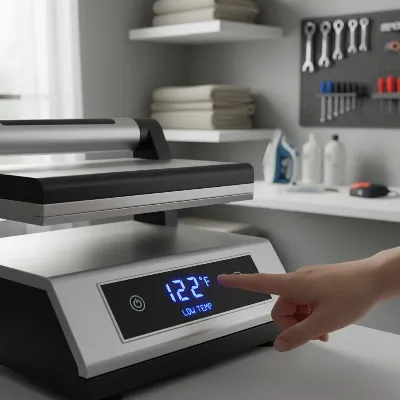 Ironing press with a slow heating issue, displaying a digital temperature that is stuck low
Common Culprits: Why Your Ironing Press Is Not Heating Up Quickly
When an ironing press fails to heat up quickly, it’s often due to one of several common issues. Pinpointing the exact cause requires a methodical approach to troubleshooting. These problems can range from simple external factors to internal component malfunctions that demand more attention.
Power Supply Problems
One of the most frequent reasons for any electrical appliance to underperform is an inadequate or faulty power supply. An ironing press draws significant power, so any hiccup in the electrical connection can drastically affect its heating capability.
- Faulty Power Outlet or Cord: A wall outlet that isn’t providing consistent power or an extension cord that is damaged or not rated for the press’s wattage can severely impede heating. Always plug your press directly into a dedicated wall outlet if possible.
- Overloaded Circuit or Undersized Breaker: Ironing presses require ample electricity. If your press shares a circuit with other high-wattage appliances, it could lead to an overloaded circuit, causing the press to heat slowly or not at all. Similarly, an undersized circuit breaker for the press’s power demands can trip or cause insufficient power delivery.
Incorrect Settings or Calibration
Modern ironing presses, especially those with digital controls, rely on precise settings for optimal performance. An overlooked setting can easily be the reason for slow heating.
- Wrong Temperature Setting: It might seem obvious, but always double-check that your press is set to the correct temperature for the fabric you’re pressing. A setting that’s too low will naturally take longer to heat up, or might not reach the desired temperature for your task.
- Software Glitches or Reset Settings: For digitally controlled heat presses, a recent software update or an accidental reset of internal settings can sometimes cause the temperature calibration to be off, leading to slow or improper heating. Manufacturers often provide specific steps to recalibrate these settings.
Component Failures
The internal components responsible for generating and regulating heat are critical. Damage to any of these can significantly impair your press’s heating speed.
- Damaged Heating Element: This is the core component that produces heat. If the heating element is damaged or has partially burnt out, it won’t be able to generate enough heat or will do so very slowly. You might notice uneven heating across the platen.
- Malfunctioning Thermostat: The thermostat regulates the temperature, turning the heating element on and off to maintain the set heat. A faulty thermostat might not accurately read the temperature or send the correct signals, leading to inconsistent or slow heating.
- Blown Thermal Fuse: A thermal fuse is a safety device designed to cut power to the heating element if the temperature exceeds a safe limit, preventing overheating. If this fuse blows, the press will not heat up at all until it’s replaced.
- Faulty Temperature Sensor: Similar to a thermostat, a temperature sensor feeds information to the control board. If it’s malfunctioning, the press’s system might not know the actual platen temperature, leading to incorrect heating cycles.
Maintenance & Usage Issues (Steam Presses)
For ironing presses equipped with steam functions, certain maintenance and usage habits can directly impact heating efficiency.
- Limescale Buildup: Over time, mineral deposits from tap water can accumulate on the soleplate and inside the steam channels. This limescale acts as an insulator, hindering heat transfer and reducing steam production, thereby slowing down the overall heating process.
- Empty Water Reservoir: Some steam ironing presses are designed with safety features that prevent them from fully heating or generating steam if the water reservoir is empty. Always ensure it’s filled before use.
- Safety Auto Shut-off: Many modern presses have an auto shut-off feature that activates if the press is left idle for a certain period. While a safety measure, it can be mistaken for a malfunction if you’re unaware it has engaged.
Internal Wiring or Connections
Inside your ironing press, a network of wires connects all components. Any loose or damaged connections can interrupt the electrical flow, preventing proper heating.
- Loose or Damaged Internal Wires: Vibrations or wear and tear can cause wires to become loose or frayed. A loose connection to the heating element, thermostat, or control board will result in a lack of power, leading to slow or no heating.
Step-by-Step Troubleshooting Guide
|
Our Picks for the Best Ironing Press in 2026
As an Amazon Associate I earn from qualifying purchases.
|
||
| Num | Product | Action |
|---|---|---|
| 1 | The Quilted Bear Mini Steam Iron - Lightweight Mini Travel Iron for Effortless Quilting & Wrinkle-Free Clothes with Hard Shell Case - Travel Steamer Craft Press for Clothes & Crafts (Black) |

|
| 2 | Cricut EasyPress Mini Heat Press - for Pressing Small Objects Like Shoes, Stuffed Animals, Hats & More - 3 Heat Settings & Precision Tip - Ceramic-Coated Heat Plate - Compact & Lightweight - Zen Blue |
|
| 3 | Steamfast SF-623 Mid-Size Steam Press with Multiple Fabric Settings and Steam Burst Function, Black, 20.47" L x 17.16" W x 6.73" H |
|
| 4 | HTVRONT Heat Press Mini Heat Press Machine, Small Heat Press Portable Iron Press Machine for T Shirts, Hats, Heating Transfer Projects (Mint) |
|
| 5 | Cricut EasyPress Mini™ LT - Mint Green - Mini Heat Press for Pressing Shoes, Baby Clothes, T-Shirts, & More - Easy to Use with a Single Setting - Precision Tip - Compact & Portable Mini Iron |
|
| 6 | DRFLASH 2-in-1 Steamer & Iron for Clothes,15s Fast Heat-up 1200W Portable Handheld Garment Steamer,Travel Size with Large Ceramic Heat Panel,Quick Wrinkle Removal,110V-120V |
|
| 7 | BLACK+DECKER Press & Steam 2-in-1 Iron and Steamer, 180% More Steam & One Temperature Technology, Ceramic Soleplate, Safe on All Fabric Types |
|
| 8 | Calogy Mini Heat Press, Heat Transfer Machine, Constant Temp Control, Insulated Safety Base, Fits for Crafts, T-Shirt, Hat, Cap, Pillows(White Pink) |
|
| 9 | BLACK+DECKER Easy Steam Compact Iron for Clothes, Automatic Shutoff, Nonstick Plate, Light Weight, 1200 Watts |
|
| 10 | Steamfast SF-680 Digital Steam Press with Multiple Fabric Settings and Steam Burst Function,Stainless/Black |
|
When your ironing press isn’t heating up fast enough, a systematic approach can help you identify and resolve the problem. Start with the simplest checks and gradually move to more complex diagnostics.
Initial Checks (Easy Fixes)
These steps don’t require any special tools or technical expertise and can often resolve common heating issues quickly.
- Check Power Source:
- Ensure the press is securely plugged into a functional wall outlet.
- Avoid using extension cords, but if you must, ensure it’s heavy-duty and rated for the press’s wattage.
- Test the outlet by plugging in another appliance (like a lamp) to confirm it’s live.
- Verify Temperature Settings:
- Confirm that the temperature dial or digital control is set to the desired heat level, not on a low or “min” setting. Consult your user manual for recommended temperatures for different fabrics.
- Ensure Water Reservoir is Full (if Steam Press):
- If your press has a steam function, check that the water tank is filled to the appropriate level. Some models will not heat or steam correctly if the reservoir is empty.
- Reset by Unplugging:
- Unplug the ironing press from the wall outlet for 5-10 minutes. This can sometimes reset internal electronics and resolve minor glitches. Plug it back in and test again.
Intermediate Checks (Requires Caution)
These steps involve a bit more observation and possibly simple cleaning or resetting, but still largely avoid disassembling the unit.
- Inspect for Limescale Buildup:
- Examine the soleplate (the heated surface) for any visible white, chalky residue, especially around steam vents. If present, follow your manufacturer’s instructions for descaling or cleaning. A common method involves a damp cloth with white vinegar or a specialized iron cleaner.
- Check for Auto Shut-off Engagement:
- If your press has been idle for a period, it might have automatically turned off or entered a low-power mode as a safety feature. Consult your manual to understand how to reactivate it or prevent it from engaging unexpectedly during use. Moving the handle or pressing a button usually reactivates it.
- Reset Digital Settings (if applicable):
- For presses with digital control panels, there might be a specific sequence to reset or recalibrate the temperature settings if they appear incorrect. Refer to your user manual, as these procedures vary greatly by brand and model.
Advanced Checks (Professional Help Recommended)
These diagnostics involve electrical testing and potential disassembly, which carry risks. If you are not comfortable or experienced with electrical repairs, it is highly recommended to seek professional assistance. Always unplug the press before attempting any of these steps.
- Testing Heating Element:
- If accessible, a multimeter can be used to check the resistance of the heating element. An “open circuit” reading or abnormally high resistance indicates a faulty element that needs replacement.
- Testing Thermostat:
- A multimeter can check the continuity of the thermostat at different temperature settings. If the thermostat doesn’t show continuity when it should (i.e., when set to a heating temperature), it may be defective.
- Checking Thermal Fuse:
- The thermal fuse is usually a small, cylindrical component located near the heating element. Use a multimeter to check for continuity. If there’s no continuity, the fuse has blown and requires replacement. This often indicates an underlying issue that caused the fuse to blow in the first place, so further investigation might be needed.
- Inspecting Internal Wiring:
- Carefully open the press (following manufacturer guidelines) and visually inspect all wires and connections. Look for loose, frayed, burnt, or disconnected wires, especially those leading to the heating element, thermostat, and control board. Secure any loose connections, but if wires are damaged, they may need professional replacement.
> “Many heating issues in ironing presses stem from a breakdown in the electrical circuit, whether it’s a simple cord issue or a more complex component failure like the heating element or thermostat. Always prioritize safety and consult a qualified technician for internal electrical repairs.” – Sarah Jenkins, Appliance Repair Specialist
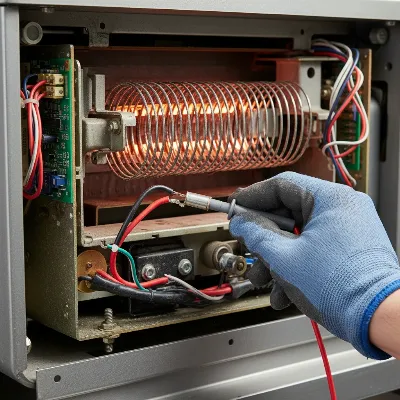 Close-up of internal components of an ironing press with a multimeter testing a thermal fuse
When to Call a Professional (or Replace Your Press)
While some ironing press issues are easily remedied, others require expert intervention or may signal it’s time for a new appliance. Knowing when to call a professional technician or consider a replacement can save you time and prevent further damage.
- Safety Concerns: If you notice burning smells, sparks, exposed wires, or if the appliance becomes excessively hot to the touch in unintended areas, stop using it immediately. These are serious safety hazards that require professional attention or immediate replacement.
- Complex Electrical Issues: If your troubleshooting points to a faulty heating element, thermostat, or internal circuit board, and you lack the experience or tools to perform the repair safely, it’s best to call a qualified appliance technician. Attempting complex electrical repairs without proper knowledge can be dangerous.
- Cost of Repair vs. Replacement: Obtain an estimate for the repair. If the cost of parts and labor approaches or exceeds the price of a new ironing press, especially if your current unit is old or frequently malfunctions, investing in a new, more efficient model might be the more economical choice in the long run. Consider the age of your press, its overall condition, and the availability of replacement parts.
Preventative Maintenance for Optimal Heating
Regular maintenance is crucial for prolonging the life of your ironing press and ensuring it heats up quickly and efficiently every time.
- Regular Cleaning: Routinely wipe down the soleplate to prevent fabric residue or starch buildup. For steam presses, periodic descaling is vital to prevent limescale from impeding heating and steam production. Use a soft, damp cloth and follow your manual’s cleaning recommendations.
- Proper Storage: Store your ironing press in a clean, dry environment. Protect the soleplate from scratches or damage that could affect heat distribution.
- Using Distilled Water: For steam presses, using distilled or demineralized water instead of tap water significantly reduces limescale buildup, which is a primary cause of slow heating and steam issues.
- Not Overloading Circuits: Be mindful of where you plug in your press. Avoid sharing a circuit with other heavy-duty appliances to prevent power fluctuations that can stress components and slow down heating.
- Regular Inspections: Periodically check the power cord for any signs of fraying or damage. Ensure all connections are secure and the unit is free from any external damage.
Conclusion
A slow-heating ironing press can be a major inconvenience, but by understanding the common causes and following a systematic troubleshooting process, you can often identify and resolve the issue. From simple checks like verifying power connections and temperature settings to more advanced diagnostics involving internal components, a methodical approach is key. Prioritize safety in all your checks, and don’t hesitate to seek professional help for complex electrical problems or if the cost of repair outweighs the value of replacement. By incorporating preventative maintenance into your routine, you can ensure your ironing press continues to heat up quickly, providing crisp, professional results for years to come.
What steps will you take today to ensure your ironing press heats up to perfection every time?
Frequently Asked Questions
Why is my ironing press taking longer to heat up than usual?
Your ironing press might be taking longer to heat up due to several reasons, including a faulty power connection, incorrect temperature settings, limescale buildup on the soleplate (for steam presses), or a malfunctioning internal component like the heating element or thermostat. Start by checking your power source and ensuring the settings are correct before investigating internal parts.
Can an overloaded circuit cause my ironing press to heat slowly?
Yes, an overloaded electrical circuit can absolutely cause your ironing press to heat up slowly or not reach its desired temperature. Ironing presses draw a significant amount of power, and if other high-wattage appliances are on the same circuit, it can lead to insufficient power delivery, hindering the press’s heating performance.
How often should I descale my steam ironing press?
You should descale your steam ironing press every 1-3 months, depending on your water hardness and frequency of use. Regular descaling prevents mineral buildup that can impede heating and steam production, ensuring efficient operation and prolonging the life of your appliance.
When should I consider replacing my ironing press instead of repairing it?
Consider replacing your ironing press if the repair cost approaches or exceeds the price of a new unit, especially if it’s an older model or frequently malfunctions. Also, if you notice serious safety hazards like burning smells or exposed wires, immediate replacement is recommended.
What are the initial troubleshooting steps for a slow-heating ironing press?
The initial troubleshooting steps for a slow-heating ironing press include checking the power source, verifying temperature settings, ensuring the water reservoir is full (for steam presses), and performing a simple reset by unplugging the unit for 5-10 minutes. These steps often resolve minor glitches.
Can using an extension cord affect my ironing press’s heating speed?
Yes, using an extension cord, especially one not rated for the press’s wattage, can severely impede heating. Ironing presses draw significant power, and an inadequate extension cord can restrict power flow, causing the press to heat slowly. Always plug your press directly into a dedicated wall outlet if possible.
Frequently Asked Questions
Why is my ironing press taking longer to heat up than usual?
Your ironing press might be taking longer to heat up due to several reasons, including a faulty power connection, incorrect temperature settings, limescale buildup on the soleplate (for steam presses), or a malfunctioning internal component like the heating element or thermostat. Start by checking your power source and ensuring the settings are correct before investigating internal parts.
Can an overloaded circuit cause my ironing press to heat slowly?
Yes, an overloaded electrical circuit can absolutely cause your ironing press to heat up slowly or not reach its desired temperature. Ironing presses draw a significant amount of power, and if other high-wattage appliances are on the same circuit, it can lead to insufficient power delivery, hindering the press's heating performance.
How often should I descale my steam ironing press?
You should descale your steam ironing press every 1-3 months, depending on your water hardness and frequency of use. Regular descaling prevents mineral buildup that can impede heating and steam production, ensuring efficient operation and prolonging the life of your appliance.
When should I consider replacing my ironing press instead of repairing it?
Consider replacing your ironing press if the repair cost approaches or exceeds the price of a new unit, especially if it's an older model or frequently malfunctions. Also, if you notice serious safety hazards like burning smells or exposed wires, immediate replacement is recommended.
What are the initial troubleshooting steps for a slow-heating ironing press?
The initial troubleshooting steps for a slow-heating ironing press include checking the power source, verifying temperature settings, ensuring the water reservoir is full (for steam presses), and performing a simple reset by unplugging the unit for 5-10 minutes. These steps often resolve minor glitches.
Can using an extension cord affect my ironing press's heating speed?
Yes, using an extension cord, especially one not rated for the press's wattage, can severely impede heating. Ironing presses draw significant power, and an inadequate extension cord can restrict power flow, causing the press to heat slowly. Always plug your press directly into a dedicated wall outlet if possible.
Troubleshoot an Ironing Press That Won't Heat Up Fast
Follow these steps to diagnose and fix common issues preventing your ironing press from heating up quickly, starting with simple checks and progressing to more advanced diagnostics.
Ensure the ironing press is securely plugged into a functional wall outlet, avoiding extension cords if possible. Verify that the temperature dial or digital control is set to the desired heat level, not a low or 'min' setting. For steam presses, confirm the water reservoir is filled.
Unplug the ironing press for 5-10 minutes to reset internal electronics. Inspect the soleplate for any visible limescale buildup, especially around steam vents. If present, follow your manufacturer's instructions for descaling or cleaning with a damp cloth and white vinegar.
If the press has been idle, it might have engaged its auto shut-off feature; reactivate it by moving the handle or pressing a button. For digital models, consult your user manual for specific steps to reset or recalibrate temperature settings if they appear incorrect.
If basic steps fail, advanced checks may involve using a multimeter to test the heating element, thermostat, or thermal fuse for continuity. Visually inspect internal wiring for loose, frayed, or burnt connections. For these complex electrical diagnostics, professional assistance is highly recommended due to safety risks.

This was super helpful! My ironing press was taking ages to get hot, and I always just assumed it was old. After reading about incorrect settings, I realized I had it on the wrong fabric type for what I was pressing. Now it heats up much faster and my shirts are done in no time.
I tried all the basic checks, including verifying the power source and temperature settings, but my press is still heating up slowly. It’s a bit disappointing as I was hoping for a quick fix. I guess I might have a more serious issue like a faulty thermostat, which is beyond my DIY skills.
I was so frustrated with my ironing press taking forever to heat up. I followed the advice about checking the dedicated wall outlet and it made a huge difference! It’s still not lightning fast, but it’s definitely better than before. Thanks for the practical tips.
My old press was really struggling to get to temperature, and I thought I’d have to buy a new one. The section on internal component failures, especially the heating element, gave me the confidence to open it up and take a look. Turns out, it was a simple fix! Saved me a ton of money.